How to convert a KORG Pa5X KST to a Pa4X SET
A Pa4X cannot open a Pa5X KST by itself. Pa Studio Suite reads the KST and writes a SET in the Pa4X format for the Pa4X, Pa4X Musikant, Pa4X Oriental, Pa1000 or Pa700: the Styles, the own Sounds and Drum Kits with their samples, the Keyboard Sets and the Pads. You need the Professional or All Access license.
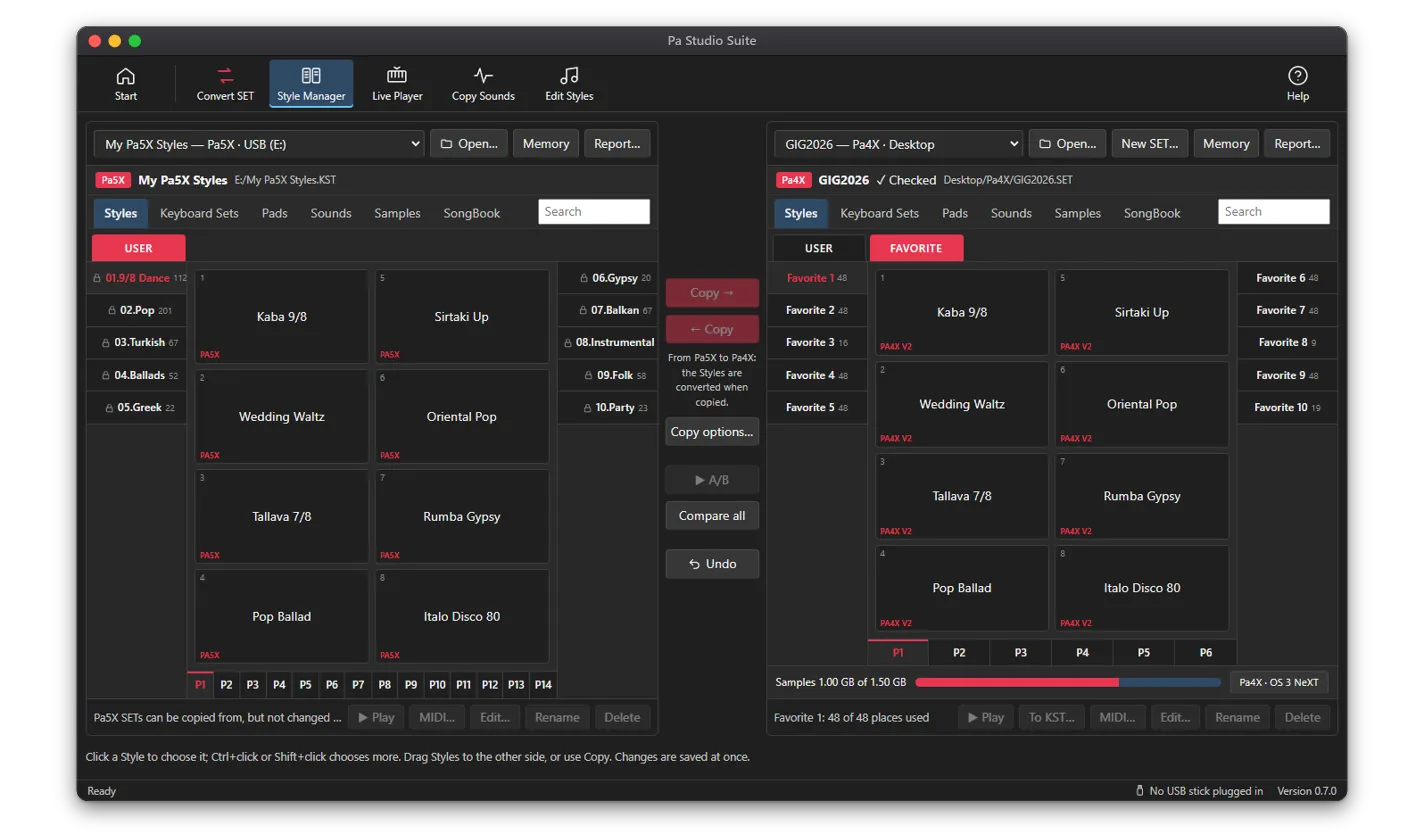
What comes over from the Pa5X, at a glance
- Styles: every element, all eight tracks, chord variations and chord tables, tempo, time signature, mixer, the four Single Touch Settings and the Style effects
- Own Sounds and Drum Kits, with the Multisamples, Drum Samples and samples they play
- Keyboard Sets, as Pa4X Keyboard Sets
- Pads, with their Pad Type (One Shot or Loop), including the Pads a Style carries
- SongBook: a list of every entry and where its Style went (the Pa4X SongBook format is not known yet, so the entries are not written into the SET)
The app only reads your KST and writes a new SET. Where a Pa4X has no place for a Pa5X setting, the closest Pa4X setting is used and the conversion log names it. Global settings do not come over.
How to convert a Pa5X KST to a Pa4X SET
- 1Plug in the USB stick with the KST, or copy the KST folder to your computer. The app looks for SETs and KSTs on USB sticks, the Desktop, Downloads and Documents.
- 2Open Pa Studio Suite, choose Convert SET and pick the KST. To convert several KSTs with the same choices, hold Ctrl and click them.
- 3Choose your exact keyboard: Pa4X, Pa4X Musikant, Pa4X Oriental, Pa1000, Pa1000 Musikant, Pa700, Pa700 Musikant or Pa700 Oriental. For a Pa4X, also choose its operating system: OS 3 is the default; OS 1.x and 2.x have less sample memory and a shorter factory Sound list.
- 4Choose what comes over: Styles, own Sounds and Drum Kits, Keyboard Sets, Pads, SongBook. Own Sounds come with the Styles. Look through the report of your own Sounds on that model and the list of factory Sounds it lacks.
- 5Choose where to save: straight to the USB stick, the folder “Pa converted” on your Desktop, or another folder. The app checks that there is enough free space.
- 6Convert. The new SET is called “<KST name> <model>.SET”, and a log beside it (“… log.txt”) lists every change. Your KST is not changed.
- 7Load the SET on the keyboard from the USB stick with Media > Load.
Styles, element by element
- Variation 1, 2, 3 and 4
- Intro 1 and Intro 2
- Count-In
- Fill 1, 2, 3 and 4
- Break
- Ending 1, 2 and 3
Each Pa5X Style is rebuilt as a Pa4X Style. Every element the Pa5X Style has comes over to the same element on the Pa4X:
Tracks, tempo and names
All eight Style tracks come over: Drum, Percussion, Bass and Accompaniment 1 to 5, with their notes, the chord each track was recorded in (so it transposes as on the Pa5X), the note transposition settings, key ranges and Wrap Around. The time signature of each element and the Style tempo come over as they are. A Style recorded at another MIDI resolution is rescaled to the Pa4X’s 384 ticks per quarter note, and the log says so.
Style names come over. A Pa4X shows only Latin letters, so Cyrillic and Greek names are spelled out in Latin letters, and characters it cannot show are left out.
Chord variations and chord tables
This is where the Pa5X and the Pa4X differ most. On a Pa5X every track has its own chord table: for each of the 24 chord types it says which of its variations the track plays. A Pa4X has one chord table for the whole element. The app looks at every chord type, takes the combination of variations that all tracks play for it, and makes each different combination one Pa4X chord variation, so the Style changes its patterns on the same chords as on the Pa5X.
A Pa4X has room for 6 chord variations in each Variation and 2 in each of the other elements (Intros, Fills, Break, Endings, Count-In). When a Pa5X element needs more combinations than that, it is reduced to 6 or 2 and the log names the element. The method was checked against Korg’s own Pa4X version of one of its Pa5X Styles.
Sounds, mixer, STS and effects of each Style
- Each track’s Sound, volume and pan, taken from its part in Variation 1 (or the first element that has the track).
- The four Single Touch Settings (STS): Sound, volume, pan and mute of each keyboard part, and their effects. A Style with fewer than four STS gets Pa4X defaults for the missing ones.
- Effects 0 to 127 are the same on both keyboards and are copied with all their parameters. Effects only the Pa5X has (number 128 and up) keep the Pa4X default for that slot, and the log names them.
- A Pa4X STS has two effects. A third effect in use on the Pa5X has no place and is left out; the log says so.
- Pa5X factory Sounds a Pa4X does not have get the closest factory Sound of your exact model, by name; the log lists every change. The Convert wizard shows them, most used first, and you can pick another; your choice is saved.
Own Sounds, Drum Kits, Multisamples and samples
- Places: a Pa4X SET has 6 user Sound banks and 3 Drum Kit banks of 128 (768 Sounds, 384 Drum Kits). Sounds of Pa5X banks 1 to 6 and Drum Kits of banks 1 to 3 keep their places. Used Sounds from the banks only the Pa5X has move to free places, and the Styles, Keyboard Sets and Pads are pointed there.
- When there are more own Sounds than places, the most used are kept and the tracks of the others get the closest factory Sound. The log names them.
- Factory Multisamples inside an own Sound are matched to the Pa4X ones by name.
- A Pa4X Drum Kit key has up to four velocity layers; layers past four are left out and reported.
- Sounds the KST keeps in older formats are passed on as they are; the Pa4X family loads those formats.
- The samples are repacked into new PCM files (RAM01 to RAM99), the way a Pa4X saves them.
The own (user) Sounds and Drum Kits of the KST come over with the Styles, converted to the Pa4X Sound format, together with exactly the Multisamples, Drum Samples and samples they play. Samples that no Sound plays stay behind. Every own Sound comes along, not only those a Style selects, as far as the SET has places for them.
Keyboard Sets
Each Pa5X Keyboard Set becomes a Pa4X Keyboard Set: the four keyboard parts with their Sounds, volume, pan and mute, and two effects (a third Pa5X effect has no place, as in the STS). Parts that play an own Sound point at its new place in the SET. A Pa4X holds 11 banks of 48 Keyboard Sets (528), a Pa1000 or Pa700 9 banks of 48 (432).
Pads
Pa5X Pads become Pa4X Pads with their notes, chord variations and chord table, time signature and Sound, and the Pad Type (One Shot or Loop) is kept. Pads a Style holds only as its own copy come along too, and each Style selects its Pads at their new places. The Pa4X family has 10 Pad banks of 48 (480 Pads).
SongBook
The Pa4X SongBook format is not known yet, so no SongBook is written into the SET. Instead, a list called “<SET name> SongBook.html” is written next to the SET: every entry with its bank, number, name, genre, tempo and time signature, its Style, and where that Style is in the new SET. Entries that use a Pa5X factory Style are marked; choose a Style for them again on the keyboard.
Memory and places of the Pa4X, Pa1000 and Pa700
| Keyboard | User sample memory | Sample places | Own Sounds / Drum Kits | Style banks |
|---|---|---|---|---|
| Pa4X, Pa4X Musikant, Pa4X Oriental (OS 3) | 1.5 GB | 15,048 | 768 / 384 | 10 Favorite + 3 User of 48 (624 Styles) |
| Pa4X family on OS 2.x | 400 MB | 15,048 | 512 / 256 | 10 Favorite + 3 User of 48 (624 Styles) |
| Pa4X family on OS 1.x | 400 MB | 12,672 | 512 / 128 | 10 Favorite + 3 User of 48 (624 Styles) |
| Pa1000, Pa1000 Musikant | 480 MB | 15,048 | 512 / 256 | 12 User of 48 (576 Styles) |
| Pa700, Pa700 Musikant | 128 MB | 15,048 | 512 / 256 | 12 User of 48 (576 Styles) |
| Pa700 Oriental | 160 MB | 15,048 | 512 / 256 | 12 User of 48 (576 Styles) |
A Pa5X has 4 GB of user sample memory, so a large KST can need more than any Pa4X-family keyboard has. Sample places are how many samples the keyboard loads, whatever memory is left.
When the KST is bigger than your keyboard
- Before you convert, the wizard shows for your exact model (and Pa4X OS) how many of your own Sounds fit its places and sample memory, which get a close factory Sound, and how much memory all of them would need. Sounds with no close factory Sound come first, then the most used; shared samples are counted once.
- Korg compression: the Pa4X family plays Korg-compressed samples. With the compression option, on by default, plain 16-bit mono samples are written compressed the way the keyboard does: half the memory, with a very small loss. Bright, noisy sounds stay as they are.
- Nothing is cut without telling you. The SET is written with everything, then checked against your model’s banks, places, memory and sample places. If anything is over, the log says what and by how much, and “DO NOT INSTALL AS IS.txt” is put inside the SET. Remove what you do not need in the SET / KST Manager before loading it: a SET over the keyboard’s memory can crash it.
- Styles go in banks of 48, each Pa5X Style folder starting a new bank. Banks past your model’s own are added in the same SET (FAVORITE11 and up on a Pa4X), which the keyboard does not load: move what you want into its own banks. Only past what one SET can name does a second SET start beside it.
- Every SET written is checked the way a keyboard checks it before loading. Keep a backup of your keyboard’s data before you load any new SET.
Also from the Pa5X to the Pa3X family and the Pa2X
The same KST can become a SET for a Pa3X, Pa3X Le, Pa900, Pa600, Pa300 or Pa2X. Styles, Keyboard Sets and Pads come over; for own Sounds, Drum Kits and samples, the Styles use the closest factory Sound of your keyboard. The KST to SET converter page shows every model.
Which license you need
Converting a Pa5X KST into an older SET, and the report of how your own Sounds fit, are part of Pa Studio Suite Professional and All Access. Standard converts SETs in both directions, and SET Styles to a Pa5X KST.
Questions
Can a Pa4X load a Pa5X KST?
Not as it is: the Pa4X does not know the KST format. Pa Studio Suite, a desktop app for Windows and macOS, converts the KST into a Pa4X SET with the Styles, own Sounds, Drum Kits and samples, Keyboard Sets and Pads. KST to SET is part of the Professional and All Access licenses.
Will my Pa5X sounds work on the Pa4X?
Your own Sounds and Drum Kits come over with their samples, converted to the Pa4X format. The Pa5X factory Sounds belong to the keyboard and are not in the KST, so a track that uses one gets the closest factory Sound of your Pa4X model, found by name. The log lists every replacement, and you can choose another one in the Convert wizard.
Do Pa5X Styles keep their chord variations on a Pa4X?
Yes, as far as the Pa4X has room: each different combination of the Pa5X tracks’ variations becomes one Pa4X chord variation, up to 6 per Variation and 2 per Intro, Fill, Break, Ending and Count-In. Where an element needs more, the log says so.
Pa4X OS 1 or 2 vs OS 3: does it matter?
Yes, for memory. On OS 3 a Pa4X has 1.5 GB of user sample memory, 768 own Sounds and 384 Drum Kits. OS 1.x and 2.x have 400 MB and 512 own Sounds (128 Drum Kits on OS 1, 256 on OS 2), 12,672 sample places on OS 1, and fewer factory Sounds. Choose your OS in the app, and the SET is planned and checked for it.
What if my KST does not fit in the Pa4X memory?
The app shows before converting how many of your own Sounds fit, and can write plain samples Korg-compressed at half the memory. If the SET is still over, it says what is too much and marks the SET “DO NOT INSTALL AS IS” until you remove what you do not need.
How long does it take?
A conversion can take a few minutes, and the app shows its progress. If you save straight to a USB stick, do not unplug it while it writes.
Is my KST changed?
No. The app only reads the KST and writes a new SET.
Does it work on a Mac?
Yes, on Windows 10/11 and macOS 11 or later.