SET / KST Manager: edit and combine KORG Pa SETs
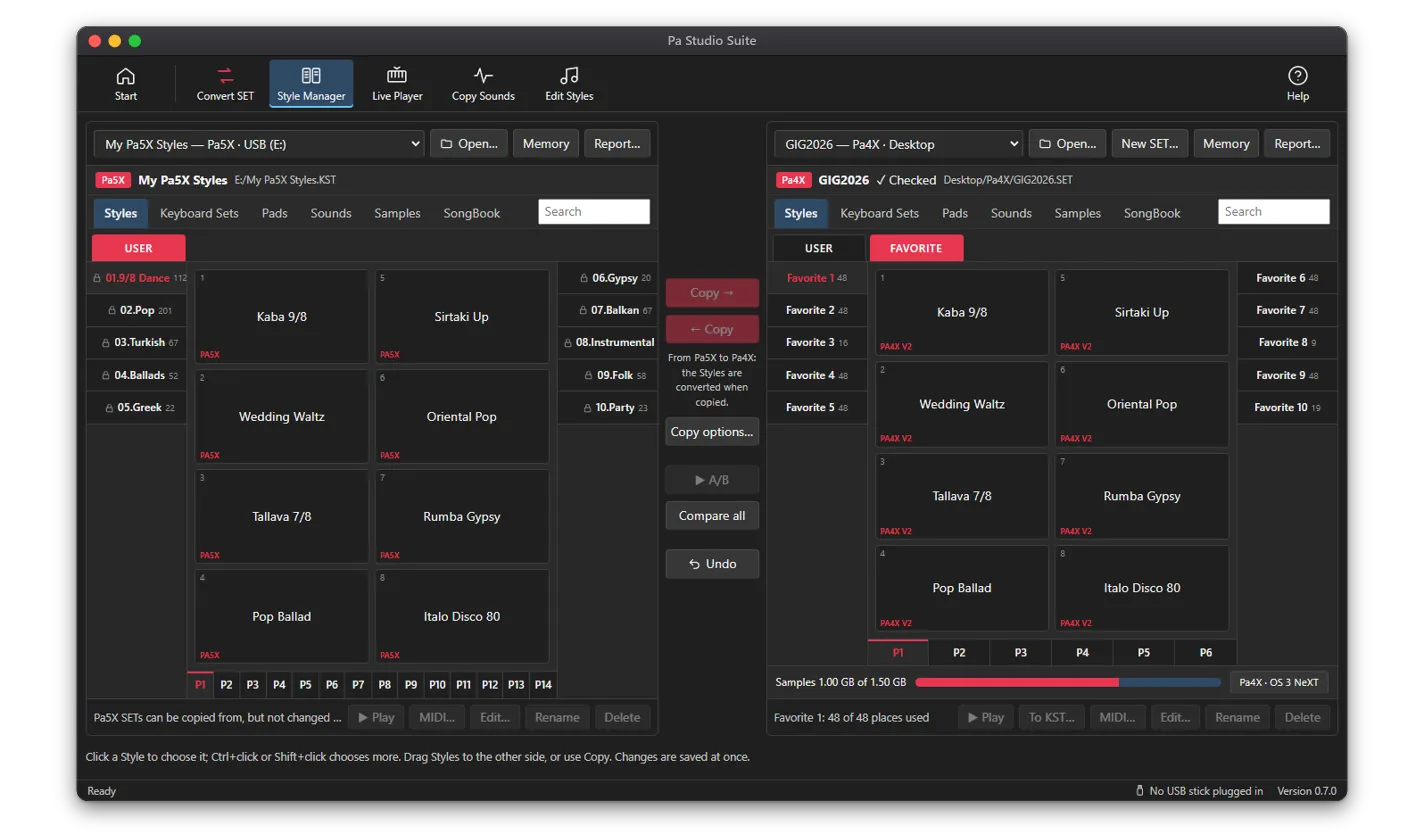
The SET / KST Manager of Pa Studio Suite opens two SETs or KSTs side by side, like two USB sticks on one desk. Copy Styles, Keyboard Sets, Pads and own Sounds from one to the other, and they are converted for the keyboard on the way. Rename, reorder and clean up, with Undo for every step.
What you can do
- Tabs for Styles, Keyboard Sets (Performances on Pa3X-family SETs), Pads, Sounds, Samples and SongBook
- Copy with Copy → and ← Copy, drag and drop, or Ctrl+C, Ctrl+X and Ctrl+V; Ctrl+click to choose several, Ctrl+A for all
- Rename and Delete; drag a bank onto another to swap them, or onto the other side to copy it whole
- Search in every tab, across all banks
- Undo for every change; changes are saved into the SET at once
- New SET… for an exact keyboard, and Copy a whole SET as it is… (byte for byte, locked Styles and samples stay locked)
- Report… lists every Style (bank, tempo, Sound per track), Keyboard Set, Pad and own Sound, as a web page or spreadsheet
Copies are converted on the way
Copy from a Pa3X SET into a Pa4X SET, or back, and each Style, Keyboard Set and Pad is rewritten for the other keyboard, with Sounds the exact target model has. The same works into Pa1000, Pa700, Pa900, Pa600 and Pa300 SETs.
Into a Pa4X-format SET or a Pa5X KST, the own Sounds the copied items use come along, with only the Multisamples and samples they need; a Sound the target already has is used again. Copying into a Pa4X-format SET, the app lists those Sounds and you tick which to bring; the rest get the closest factory Sound. Copy options… sets what happens by default: bring own Sounds, use the closest factory Sound, skip what the target already has.
Pa5X KSTs can be written to as well: copy Styles, Keyboard Sets and Pads into your own KST, rename and delete them, and add banks with New bank…; a copy that takes a KST past the Pa5X’s 4 GB of sample memory is kept whole, and the app says at once that it must be brought down before it loads.
How it works
- 1Open the SET / KST Manager. Your SETs on USB sticks and the Desktop are in the list at the top of each side.
- 2Choose a SET or KST on the left and another on the right (Open… for one in another folder).
- 3Choose a tab and a bank, click what you want (hold Ctrl for more) and press Copy →, or drag it across.
- 4Answer which own Sounds come along, if the app asks.
- 5Check the memory bar, then copy the SET to a USB stick and load it on the keyboard.
Sounds, memory and SongBook
The Sounds tab shows where each own Sound is used, finds duplicates, and has Delete unused, Replace… (one Sound for another in every Style) and Move… (another place; every Style, Keyboard Set and Pad follows). The Memory window shows sample memory, own Sounds, Drum Kits, Styles, Keyboard Sets and Pads against what your keyboard holds.
The SongBook tab lists each entry with its genre, tempo, meter and Style, with Show Style and Play. SongBook entries can be viewed here, not edited.
Which license
Managing SETs, copying between SET generations in both directions, SET to KST and A/B compare are part of every license: Standard, Professional and All Access. Copying from a Pa5X KST into an older SET needs Professional or All Access.
Questions
Is there a SET editor for Korg Pa keyboards?
Yes. The SET / KST Manager of Pa Studio Suite opens Pa SETs and Pa5X KSTs on Windows and macOS, and copies, renames, deletes and reorders Styles, Keyboard Sets, Pads and own Sounds, with Undo.
Can I combine Styles from several SETs into one?
Yes. Open the SET you want to fill on one side and the others one after another on the other side, and copy the Styles across. New SET… makes an empty SET for your exact keyboard to start from.
Do the Sounds come along when I copy a Style?
Into a Pa4X, Pa1000 or Pa700 SET or a Pa5X KST, yes: the own Sounds they use come along, with only the samples they need. You can also leave them out, and the tracks get the closest factory Sound of your model.
Is my original SET changed?
Only the SET you copy into, rename or delete in, and Undo brings each change back. Copy a whole SET as it is… makes a copy to work on.