Play KORG Pa Styles on your computer
The Live Player of Pa Studio Suite plays the Styles of a SET or KST the way an arranger does: you play chords, the Style follows. Use a MIDI keyboard, your Pa over USB, or the keys on the screen, and hear a Style or a conversion before it goes onto the keyboard. Included in every license.
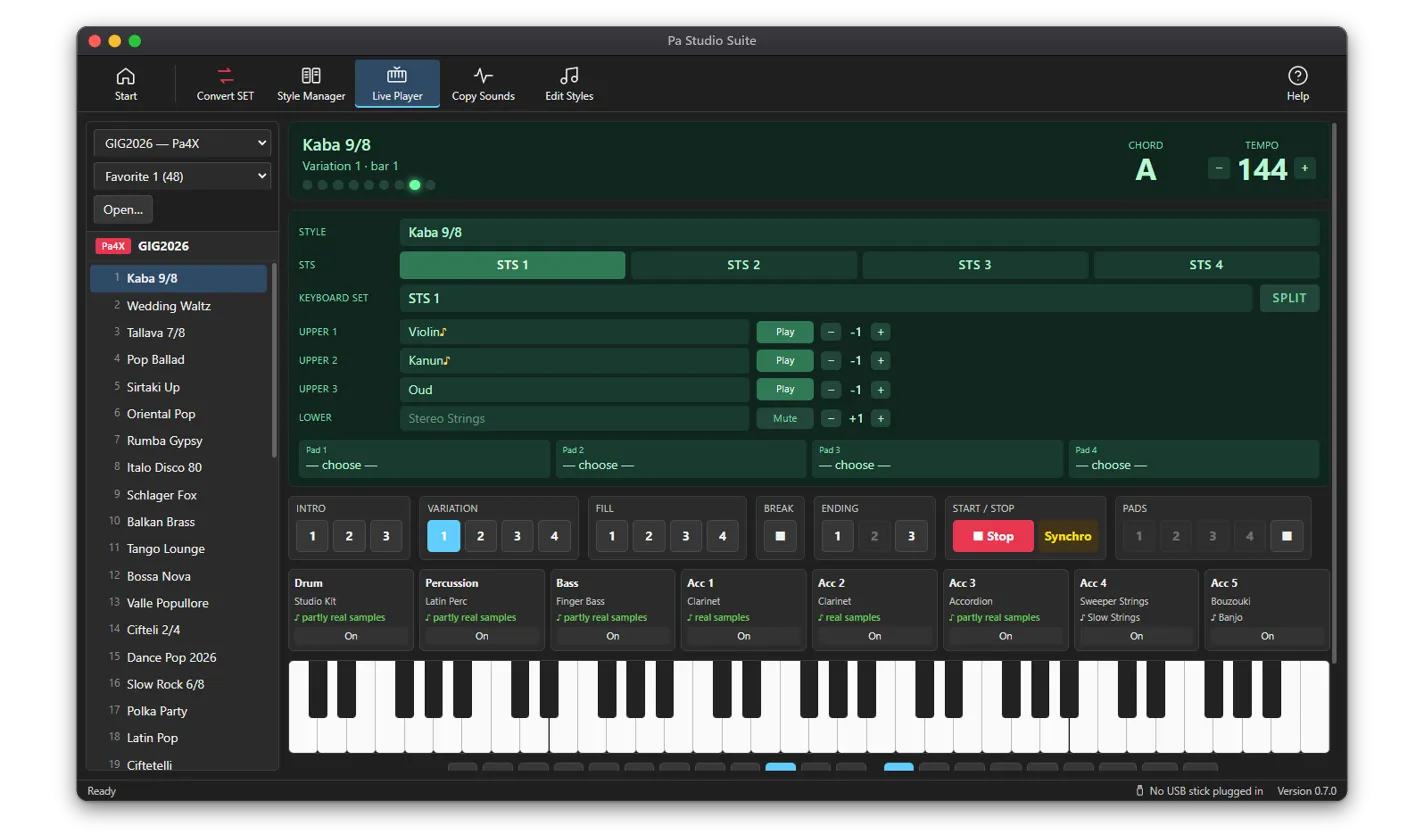
What the Live Player does
- Plays Styles from Pa5X KSTs and from Pa4X, Pa1000, Pa700, Pa3X-family, Pa2X and Pa800 SETs
- Intro, Variation, Fill, Break and Ending buttons, Synchro Start and Synchro Stop, Tempo and Transpose
- Chord recognition below the split point, with Chord Scan Lower and Upper, Memory, Bass Inversion, Manual Bass, Auto Fill, Fade In/Out and Tempo Lock
- Each track moves to your chord as on a Korg arranger, and chord variations change with the chord type
- 4 Pads from any SET or KST: they follow the chord and the tempo, as one-shot or loop
- Own Sounds of the SET or KST play their real samples, Korg-compressed ones included
- A SCALE page with quarter tones and maqam presets for the player’s own sounds
How to play a Style
- 1Connect a MIDI keyboard or your Pa to the computer with a USB cable, or use the keys on the screen.
- 2Open the Live Player, choose a SET or KST in the list (or Open… for one in a folder) and a bank.
- 3Click a Style. On the Settings page, choose My keyboard and where the sound comes from under Play on.
- 4Press START/STOP or the space bar, and play a chord with your left hand below the split point.
- 5Change Variations while it plays (they switch at the next bar), add a Fill or a Break, and end with an Ending.
Where the sound comes from
Built-in sounds: the app ships with a General MIDI sound set (GeneralUser GS), and each track plays the General MIDI instrument its Korg Sound is based on. That is close, but it is not the keyboard’s own Sound.
Your Pa: connect it by USB and choose it under Play on. The app sends Korg Bank Select and Program numbers, so every track plays the keyboard’s real factory Sounds. You can also play own samples on the computer and factory Sounds on the keyboard at the same time.
Check a conversion before loading it
Open a KST and the SET made from it side by side in the SET / KST Manager and press Hear both: the Live Player plays the Style on the left (A) and the one on the right (B), and you switch between them on the same section, bar and chord. Compare all goes through every Style of the two SETs and lists which play the same notes and which differ.
From the SongBook tab, Play opens an entry’s Style at the entry’s tempo.
Which license
The Live Player and A/B compare are part of every license: Standard, Professional and All Access.
Questions
Can I play Korg Pa Styles on a PC or Mac?
Yes. Pa Studio Suite, a desktop app for Windows and macOS, plays the Styles of Pa SETs and Pa5X KSTs with chord recognition, Variations, Fills, Intros and Endings, from a MIDI keyboard or the keys on the screen.
Do I need a keyboard connected?
No. You can click the keys on the screen and press START/STOP. A MIDI keyboard over USB makes it feel like playing the real arranger.
Does it sound like my Pa?
The built-in sounds are General MIDI stand-ins, close but not the same. Own Sounds in the SET play their real samples. For the real factory Sounds, connect your Pa by USB and play the Style on it.
Can I play Pa5X Styles without a Pa5X?
Yes. Open the KST in the Live Player and play its Styles from your MIDI keyboard.